Say what you need. Don't wait for someone to build you another app.
We don't ship feature apps. We turn requirements into implementations.
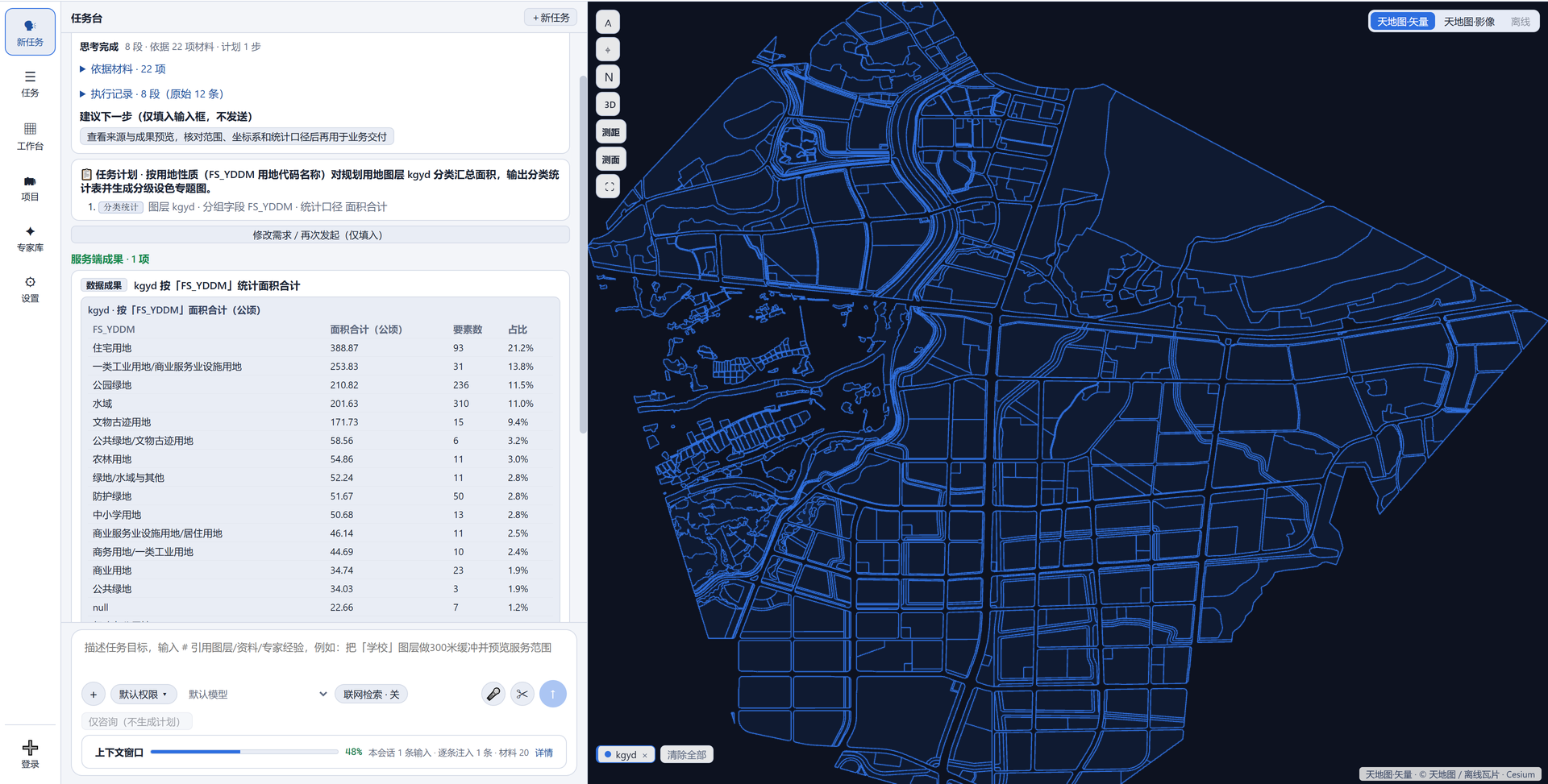
Describe the job in one sentence. It becomes a step-by-step plan you can check, runs on your own machine, and hands back layers, tables and a deliverable pack.
The bar we hold ourselves to: a result you would put in front of your director without redoing it.
Windows / macOS / Linux · two ways in — an email sign-in with the network up, or a license file for this machine that works online and offline alike · a fresh install opens with a 3-day trial · the free edition keeps every action; its outputs carry one brand line
App screenshot · v1.0.0
One sentence in, four steps out
This is the default path, not a demo exception.
State it: pick layers and describe what you need in a sentence.
Read the plan: laid out as steps — action, referenced layers, parameters.
Approve: only two cases stop you — the run would execute model-generated code, or external content takes part in the computation.
Run and review: fingerprints are checked first and a change stops the run; a failed step stops and reports the reason, never skipping silently.
No action in the current set modifies existing data: outputs are new layers and files in a local task folder. To roll back, delete the new layer.
Platform only
You state the need: if it's clear it runs, if it isn't it asks
The action set is generic. How it gets combined is decided by your sentence. The platform doesn't decide what you want, and it doesn't guess.
Which layers are referenced, which actions run, what comes out — all laid out for you.
When a reference is ambiguous it asks you one question instead of guessing a rule and running on.
Only the things you named get touched; your source data isn't rewritten along the way.
Generic actions31
Preset workflow templatesNone
Ambiguous referenceAsk, never guess
App screenshot · v1.0.0
Auditable
Your sentence becomes a step list first; it runs when you approve
“Natural language GIS” is no longer a novelty. The hard part is what comes after: whether the output can be checked.
Every step, every layer touched, every output block — visible before you approve.
Layer fingerprints are re-checked before execution; if one changed, it stops.
A failed step stops the run and states why — no skipping ahead to keep producing numbers.
Every model call is booked on this machine: a usage & effect view on the task page compares calls, tokens, first-pass rate and completion rate per model. You enter the prices; a model with no price entered is named as unpriced instead of shown as free.
Stops you before approval2 cases only
Actions that modify existing dataNone
On failureStop and report
Usage & cost bookkeepingLocal, per model, exports as CSV
App screenshot · v1.0.0
Reproducible
Ask the same question twice, get the same steps and the same number of outputs
The plan skeleton is pinned to your wording in code, not re-rolled per run; every statistic has a single source.
Areas are measured on the sphere, on this machine, always in hectares; the share is against the whole layer.
The same count is reused in table, chart and report — never three versions.
The model writes the report prose but not the numbers in it: each figure is measured here and filled in, and if a figure can't be computed the step fails.
Area basisSpherical, on-device
UnitHectare
Max chart slices8
Report figuresFilled locally
App screenshot · v1.0.0App screenshot · v1.0.0 · capped at eight slices, long tail merged into “Other”
Data stays local
The model receives layer names, feature counts and the first 3 attribute rows — nothing more
It never sees coordinate sequences and never gets your files. Layers and outputs are read and written only on your machine.
There are seven outbound paths in total, each with what it sends, who sets the address and whether it can be switched off — the Boundary menu lists them one by one.
Model endpoint and key are entered by you and stored only here; the interface shows them masked.
A local Ollama / LM Studio / vLLM instance is one click to connect: no key, and a capability self-test runs right after.
Security in Settings folds approvals, outbound sends, watermarks and execution into one local policy: it can only be tightened, widening gets clamped back; every allow or block leaves one log line, kept 180 days, never uploaded.
No telemetry, crash reporting or usage statistics anywhere in the codebase.
Coordinates in request bodyNo
Attribute sampleFirst 3 rows
No model configuredError, never a fake result
App screenshot · v1.0.0App screenshot · v1.0.0 · keys live only in the local database and are displayed masked
Before submission
Nine classes of problems in one scan; overlaps reported as “how much”, not IoU
Checks are read-only; cleaning writes a separate layer and leaves the source untouched.
Out-of-range coordinates, unclosed rings, self-intersections, degenerate polygons, duplicate vertices and more — nine classes.
Conflict ratio = intersection area / candidate parcel area: what a reviewer asks is how much of your parcel sits on the line.
A line-by-line result list, ending with not a statutory compliance opinion.
CRS resolutionManual > file > heuristic
Undetermined CRSAsk, never guess
Zero-area polygonsKept, flagged for review
App screenshot · v1.0.0
Works for one person
Sign in and work; no model needed, and the output still travels
Import, checks, analysis and export all run on your own machine, with no server of ours behind them. There are two lanes in: the online free edition signs you in with an email and needs the connection; the licensed edition imports the file your organisation issued and drops the deliverable mark — it is not an offline-only ticket, it works online and offline alike. A fresh install opens with a 3-day trial before either lane.
Deliverable pack: GeoJSON and CSV tables always included, Shapefile split by geometry type, plus a MANIFEST.
Basemap of your choice: a tile endpoint you have access to, or an offline tile pack — map output keeps working with the network unplugged.
The project's one-map panel searches layers as you type, selects all or inverts, and keeps your own layer groups saved with the project — the next session opens on the same view.
Anything outside the action list can go through a local Python channel after you review it — a guardrail, not a sandbox; we won't call it one.
DependenciesNo server, data stays local
Getting inA 3-day trial, then email sign-in or a license
LicenseOffline signature + machine fingerprint
App screenshot · v1.0.0App screenshot · v1.0.0 · no feature is cut; the difference is the output mark and three unlock slots
Who it's for · what it does
Despite the “Plan” in the name, this isn't only for planning departments. Any job that puts something on a map is in range: the data is yours, the question is yours, and the app's job is to turn that sentence into steps you can check and deliverables you can hand over.
One prerequisite: you need spatial data. Industry definitions, current boundaries and statutory conclusions are not something we supply — they belong on your side.
Where it fits: read in the data you already have, check it clean, compute it, draw it, hand it over — multi-format import with CRS resolution, parcel self-checks plus overlap and intersection, statistics and map production, a deliverable pack including DXF drawings and PPTX decks, a 2D/3D map view with on-map analysis, six kinds of project material with project workspaces, and a local Python escape hatch. Industry scenarios are not built-in packs: plan review, option comparison, monitoring, emergency delineation are all assembled from the same parts by your sentence.
Stated limits: conclusion cards always say “not a statutory compliance opinion”; written report export is a licensed unlock; on-map analysis covers ground relief only, not buildings or vegetation; online reference layers are for viewing, not computing; the free edition adds one brand line to deliverables.
Land use / natural resourcesHow much protected farmland does the plan sit on? List it parcel by parcel
Edit polygons → overlay against the boundary layer you tagged → per-item finding → statistics and shares → map → deliverable pack.
No built-in zoning dataset ships with it; you name the categories and draw the lines.
Forestry / grasslandWhich parcels fall inside the forest map, and how many hectares each
Intersect → measure locally → summary table → table and layer back to you.
No standing inventory data, and no approval workflow.
Water / river corridorsParcels within 200 m of the river corridor boundary
Buffer → intersect → attribute filter → one table plus one colored map, in a single pass.
No live hydrological feeds, no flood modelling.
Transport / municipal worksHow many parcels within 500 m of this line, and of which classes
Buffer → intersect → grouped statistics and charts → graduated colors; points by centroid and attribute expressions.
No road network topology, so no reachability or isochrones.
Energy / pipelinesA ledger of parcels within 30 m of the alignment, by land class
Buffer → intersect → filter → table with shares and a total row, dropped straight into your ledger.
No pipe diameter or pressure engineering; slope is terrain relief, not design grade.
AgricultureTwo vintages side by side: what's new, what's gone
Two-date difference into new / lost / changed / retained, with shares and a colored map.
No national land-cover survey data included.
Emergency / hazard responseColor risk surfaces by level and list the assets inside the zone
Graduated colors plus buffer-intersect delineation; the list comes out as a table; offline tiles keep map output working.
No live monitoring feed, no risk simulation, not a command platform.
Heritage / education / healthWhich parcels are inside the protection boundary and its buffer
Import the boundary as an ordinary layer, tag it as a red line, then run overlay and listing; for “how many sites per district” use spatial join.
Field formats and definitions for your registry are yours to verify; nothing is preset.
Universities / research groupsOverlay these points with administrative districts; area and share per district
Intersect → group by field with a total row → charts → deliverable pack; the individual edition is free, with no server to request.
No statistical tests, and no raster image analysis.
These are not a feature list — they are the same generic actions assembled differently per sector. Unlisted sectors work the same way: if you can say “which things + what spatial relation + what result”, it can be assembled. Where it can't, we say so: no industry business libraries, no model simulation, no live data feeds, no statutory conclusions.
Data boundary: a list, not a promise
We don't say “fully offline, never uploads”. The eight rows below state what goes out, who sets the target address and whether it can be switched off: the first seven use the network, the last one doesn't.
#
Path
What is sent
Who sets the target
Can it be turned off
1
Model calls
Your instruction + context highlights + layer metadata and the first 3 attribute rows. No coordinate sequences. The call and token bookkeeping for the usage view is written here, on this machine
Whichever provider you configure (self-hosted included)
Nothing is sent until configured; without a model it errors rather than fabricating a result
2
Web search
One query term only — no document body, no project context
A fixed public search endpoint
Asks each time by default; can be banned entirely in Security
3
External tools you connect
The tool name and parameters you reviewed
The address you entered
Silent unless connected; confirmed per call
4
Release manifest
No user data, one static read
A default address compiled into the binary, editable
Can be switched off in Security; when on, it reads the manifest only
5
Sign-in
Email + password — the service keeps a hash, and this app stores no password at all
The official auth service is built in, so a fresh install can register the moment it opens (the emailed confirmation link must be opened before the first sign-in); typing your own address moves it to a private deployment, and only saving it explicitly blank closes this path
Needed to get in unless a valid license is on this machine or the 3-day trial is still open; one switch in Security decides whether the email may leave
6
Online basemap tiles
Tile coordinates + your own key
The tile endpoint you configure
Pick an offline basemap and nothing is sent; no key, no tiles
7
Fetching an online service
One service address you enter + layer id + paging parameters. No project, no local data
The address you enter (intranet and VPN services are the common case)
Nothing is sent until you identify and fetch; registering a reference stays offline. A token passes through that single request and is never stored
8
Local imagery extraction / offline basemap
No network
—
—
Beyond these eight: the interface only calls the backend on 127.0.0.1, and the backend only listens there. No telemetry, crash reporting or usage statistics anywhere. Keys — and the optional phone number you add to your own profile — stay on this machine, and the phone is kept masked and never sent; the password you sign in with is not stored anywhere on this machine. All seven outbound switches live under Settings → Security: they can only be tightened, and every send or block lands in a local security log kept 180 days, never uploaded.
What this website itself collects
This page embeds no third-party analytics. Only when you submit the form do the organisation, role, contact and request go to this site's own backend, and only so we can get back to you. Your layers and deliverables have no upload path here — the backend writes one lead row and accepts no files.
Editions and self-hosting
Two editions, and the whole difference is one license file on this machine. The free edition keeps every action; the licensed edition opens the three paid capabilities — and a license is not an offline-only ticket, it works online and offline alike.
Online free
Licensed
Price
0
Project-based: setup + annual maintenance
For
One person on their own computer
Organisations that own spatial data — agencies, design and research institutes — and research groups on a licensed machine
Way in
Email sign-in, connection needed (a fresh install gets a 3-day trial first)
License file bound to this machine: works online and offline alike, no network block
No (the conclusion list itself is fully available)
✓ Included
Bundled authoritative boundary datasets / direct database connection
Not built
Not built; scoped per engagement
Central key management / intranet AI gateway
Not wired
Reserved; no interception point in code yet
The three unlock slots are gated by a single offline-signed license file: if it validates, all three open — and the license doesn't care about the network, so the app works online and offline alike; anything else is treated as unlicensed, with no look-alike downgrade. Without a license the main path loses nothing — outputs just carry one brand line — and on the way in a fresh install opens with a 3-day trial (same capabilities as the free edition, still branded, nothing unlocked); after that it is email sign-in with the connection up, or a valid license. Licenses bind to a machine fingerprint: no online activation, no calling home. There is no separate education edition — a licensed machine is a licensed machine, whoever it belongs to.
For pilots and self-hosting budgets, use the Contact menu: email or the form. We run remote training and one end-to-end pass on your own project data — entirely on your machines.
Download
The individual edition is free: install it, work the first three days on the built-in trial, then sign in with an email — no payment and no activation key. Importing a license file is what unlocks the three paid capabilities, and a licensed machine works online and offline alike. Where a platform has no link yet, leave a line in the Contact form and we'll send the installer.
Reading release info…
Release history
Need another format (AppImage / offline bundle / Intel Mac / volume seats)? Say so in the contact form. For self-hosting, email [email protected].
Contact / pilot request
Open to everyone, anywhere. Both routes reach the same people: reply within one business day — pick by how you prefer to be reached.
EmailSay what you're trying to do — we'll send the installer or a walkthrough slot.
FormRather not open an email? Use the form below. Organisation, what you want to solve, and an email or phone to reach you is enough.
Official accountFollow “小兔子AI2026” on WeChat and leave a message asking for a trial build — no fixed keyword, say what you need and we reply.
Scan with WeChat to follow “小兔子AI2026”
FormFor pilots and self-hosting, use the form below — organisation and the job you want done, with a phone or email to reach you.
What happens next: a short call on your data. We run one real task end to end on your machines; if the boundary doesn't fit your policies, we say so on that call.